
I Forgotten My Pattern Lock on My Andriod Phone – How to UnLock Forgotten Pattern Lock? this Problem is Solved by Team KMT in English……

Welcome to Krish Mobile Training Institute.This is my Oppo Model Andriod Smartphone Unfortunately i Forgot my Phone Password i Forgot my Phone Lock Screen Password i forgot My Screen Lock Password Which http://HOW TO UNLOCK FORGOTTEN PATTERN LOCK is why i can’t Use.This Phone if you have Forgotten the Pasword of your phone Then by BLOG Today on how to Use it to UnLock the Phone.So,let’s Start the BLOG on How to UnLock the Phone by Hard Reset if you forgot the Password.Now i will show you how to UnLock this Smartphone.


DISCLAIMER :-

This is Tutorial BLOG for Educational Purpose only,try this Method only to UnLock your own Phone.Don’t try this Method on Stolen Phones.This is Serious Crime,if you are Trying to UnLock a Stolen Phone without Permission you May Also be Jailed.
INTRO OF THE HOW TO UNLOCK FORGOTTEN PATTERN LOCK :

Hi Everyone.This is KMT Your Go-to Friend For Andriod.It’s Annoying when you forgot Pattern Lock on Your Andriod Phone and can’t UnLock the Screen to get into the Device.Calm Down.Andriod Pattern Lock forgot Sometimes could happen in any Andriod Phone.Samsung,Huawei,Xiaomi,Zte,Google pixel,one Plus,Vivo,Oppo sony,LG,HTC……you can Name a Lot.In the Following,we are going to Show you how to UnLock Forgot Pattern Lock on Andriod Phone.

Maybe,Somehow you Set a Pattern and Forgot it in an Hour or You Can’t Remember the Screen Lock Pattern on Your Old Andriod Device.You can use Fingerprints or Other ways for a While to UnLock.But,offer a Night or a Reboot,you will be asked to Unlock the Andriod Phone with Pattern.

Perhaps,you Keep trying to draw the UnLock Pattern but all the attempts are Wrong.All you See is that the Device Just Vibrates and Screen Shakes.Giving You an Alert Saying incorrect Pattern Drawn.You Might have tried the Wrong Pattern about 80 times by now but still no Success.What Happens if you Forgot Your Andriod Mobile Pattern Lock?

What Happens if you Forgot your Andriod Mobile Pattern Lock?

Al right,next we’ll show you How to Bypass the Lock Pattern.

Steps 1 :
TRY OTHER UNLOCKING OPTIONS :-
Swipe Up – Draw Your Pattern ( 8 times ).

Step 2 :
ASK YOURSELF OR YOUR FRIENDS :-
Again Swipe Up – Draw UnLock Pattern ( 3 times ).

Step 3 :
TRY SMART LOCK :-

Smart Lock :-
- On Body Directions.
- Trusted Places.
- Trusted Devices.
Krish Mobile Training Institute
Step 4 :
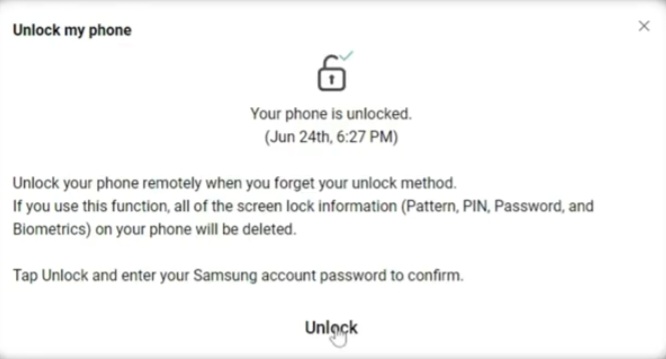
TRY SAMSUNG FIND MY MOBILE :-
Swipe Up _ Too many Incorrect Attemts UnLock Attempts _ Try again in 27 Seconds.

Step 5 :
TRY GOOGLE FIND MY DEVICE :-
Swipe Up _ Too many Incorrect Attemts UnLock Attempts _ Try again in 27 Seconds.Google Enter Your Password – Click on Next _ Click on United States.
Step 6 :
TRY THE FORGOT PATTERN FEATURE :-
Swipe Up _ Too many Incorrect Attemts UnLock Attempts _ Try again in 27 Seconds.

Step 7 :
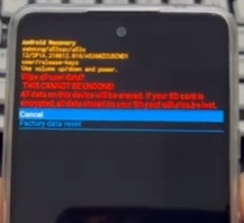
WIPE THE ANDRIOD LOCK SCREEN BY RESULTING IT :-
Swipe Up _ Too many Incorrect Attemts UnLock Attempts ( Connect to the Device ) Factory Reset Using the Volume Buttons,and Press the Power Button to Confirm.Then Use the Volume Buttons to Select Factory Reset and Use the Volume Buttons to Select the Yes,Option to Confirm.This will Trigger the Reset Process,which Should only Take you Back to the Same Select the Reboot System.

Now Option.Finally,your Phone will turn on,bypass the Forgotten Andriod Pattern Lock and Reboot to the Home Screen.At this Point,your Andriod phone has Cleared all the Data,and the Forgotten UnLock Pattern Problem will no Longer Exit.Finally,please Reset your Andriod phone Password and Save it in an important Place.Have tried all the Steps but still can’t remove the Forgotten Pattern Lock from Andriod Phone?

It’s time to Take Your Phone to the Repair Store near you and ask for help from the expert.Okay,we’ve shown you what to do if you Forgot the pattern Lock in Your Andriod Phone.Now Enter PIN.

FOR MORE INFORMATION :-
Stay Tuned by Subscribing to Our KMT Youtube Channel for Tutorial Apps and Tricks to UnLock More new Smartphones like this, www.youtube.com/@krishmobiletraininginstitute.
