New Method 2024 // Bypass Google Account Any Vivo Devices ……. this Problem is solved by Team KMT In English.
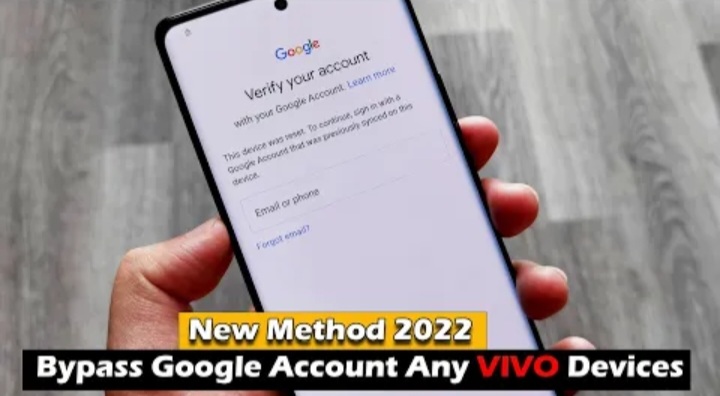
Welcome to Krish Mobile Training Institute.This is My Vivo Andriod SmartPhone Unfortunately i forgot My Phone Password i forgot my Phone Lock Screen Password which is why i can’t use this Phone.If you have forgotten the Password of your Phone then my BLOG.Today on ALL VIVO BYPASS GOOGLE ACCOUNT 2024.Use it to Unlock the Phone.So,let’s Start the BLOG on How to Unlock the Phone by Hard Reset.If you forgot the Password Now,i will Show you How to Unlock this Model Smartphone.


DISCLAIMER :-

This is Tutorial BLOG for Educational Purpose only,try this Method only to Unlock your own Phone.Don’t try this Method on Stolen Phones.This is Serious Crime,if you are trying to unlock a stolen Phone you may also be Jailed.
Step 1:
- Getting your Phone Ready.
- Click on Don’t Copy.
- Checking Info.
- Verify Pattern.
- Click on Use Lock Screen or Pattern Unlock.
- Checking Info.
- Google Verify Your Account.
- Click on Next.
- Go to Home Screen.
- Hello ! _ Click on Auxilary Settings for Reading.
- Click on Talk Back.
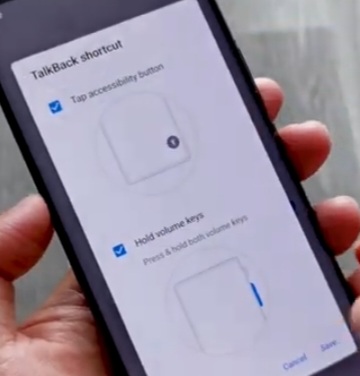
- Click on Talk Back ShortCut.
- Click on Tap Accessibility Button.
- Enable Use Talk Back.
- Try to ” Say Open Google Account “.
- Try Saying.
- Open Youtube.
- Click on Library.
- Click on ID Profile.
- Click on Settings.
- Click on About.
- Click on Play Services & Privacy Terms.
- Click on Agree & Continue.
- Vivo Browser.
- Search ICTFIX.net.
- Vivo Logo is Displayed.
- Click on 3 Line Icon.
- Click on APK FRP & APK files.
- Open Settings App.
- Click on Allow.
Step 2:
Krish Mobile Training Institute
- Click on System.
- Click on Reset.
- Click on Options.
- Click on Reset All Settings.
- Again Click on Reset All Settings.
- Please Wait.
- Vivo 5G Logo is Displayed.
- Hello ! _ Click on Start.
- Click on Next.
- Again Click on Next.
- Again Click on Next.
- Click on Agree.
- Connect to Wi-fi.
- Getting Your Phone Ready.
- Don’t go to the Next Step.
- Go to the Back Up to the _ Hello !.
- Click on Hello ! _ Click on Auxilary Settings for Reading.
- Click on Talk Back.
- Click on Talk Back ShortCut.
- Click on Tap Accessibility Button.
- Enable Use Talk Back.
- Try to ” Say Open Google Account “.
- Try Saying.
- Open Youtube.
- Click on Library.
- Click on ID Profile.
- Click on Settings.
- Click on About.
- Click on Play Services & Privacy Terms.
- Click on Agree & Continue.
- Vivo Browser.
- Search ICTFIX.net.
- Vivo Logo is Displayed.
- Click on 3 Line Icon.
- Click on APK FRP & APK files.
- Open Settings App.
- Click on Allow.

Step 3:

- Protect Your Phone PIN.
- SetUp Screen Lock.
- Click on Set.
- Click on SetUp Screen Lock.
- Click on Confirm.
- Click on Yes am In.
- Click on Yes Am In.
- Enter Password.
- Go to the Home Screen.
- Hello ! _ Click on Start.
- Click on Next.
- Again Click on Next.
- Click on Agree.
- Getting Your Phone Ready.
- Click on Don’t Copy.
- Checking Info.
- Verify PIN.
- Use My Google Account Instead.
- Checking Info.
- Click on Sign in.
- Click on Skip.
- Again Click on Skip.
- Google Services _ Click on More.
- Click on Accept.
- Again Click on Accept.
- Again Click on Accept.
- Click on Next.
- Again Click on Next.
- Disenable Click on selected App.
- Select a system Navigation Mode.
- Click on Next.
- Click on Allow.
- Loading.

FOR MORE INFORMATION :-
Stay tuned by Subscribing to our KMT Youtube Channel for Tutorial Apps and Tricks to Unlock More new SmartPhones like this,http://www.youtube.com/@krishmobiletraininginstitute.